
File Types
TailStatic is a flat file CMS. All the data and layout of the website are stored within files. Only user login, configuration and collection indexing data are stored in sqlite database.
The following are different file types in TailStatic.
Liquid files
extension: .liquid
These files are html files with templating support. Liquid is simple yet powerful templating language that TailStatic utilizes for prerendering your pages.
Example (index.liquid)
{% layout "_layout" %}
<section class="wrapper image-wrapper bg-overlay bg-overlay-400 bg-content text-white"
  style="background-image: url('images/banner-bg.webp')">
  <div class="container pt-18 pb-5" style="z-index: 5; position:relative">
    <div class="row gx-0 gy-12 align-items-center">
      <div class="col-md-10 offset-md-1 offset-lg-0 col-lg-6 content text-center text-lg-start" data-group="page-title">
        <h1 class="display-2 mb-5 text-white">
           {{banner.title}}
        </h1>
        <p class="lead fs-lg lh-sm mb-7 pe-xl-10">
          {{banner.description}}
        </p>
        <div class="d-flex justify-content-center justify-content-lg-start" data-group="page-title-buttons">
          <span><a href="/contact-us" class="btn btn-lg btn-white rounded-pill me-2">Let's Connect</a></span>
        </div>
      </div>
      <div class="col-lg-6">
        <img src="/images/banner-about-us.png" fetchpriority="high" alt="Let’s Build Something Great Together" class="w-100" />
      </div>
      <!--/column -->
    </div>
    <!-- /.row -->
  </div>
  <!-- /.container -->
</section>
In the above example, {{banner.title}} and {{banner.description}} are liquid tokens that will be replaced during rendering of the page.
The CTA however has Let's Connect text included right in the markup. TailStatic allows you to follow an approach that works best for your workflow.
If you like to separate data from markup, TailStatic gives you two ways to separate.
On-Page Data
You can use a {% json ... %} tag in the liquid file itself like below.
{% layout "_layout" %}
{% json banner %}
{
	"title": "Get the best out of your workouts",
	"description":"We offer state-of-the-art gym training services with invidividually customized programs so you can get best results."
}
{% endjson %}

... rest of liquid page as above
Data Json files
extension: .json
These are json files that allow you to separate data from liquid markup. From the above index.liquid page, the data file will be stored at pages/pages.json and will have following structure.
{
  "index":{
    "banner":{
      "title": "Get the best out of your workouts",
      "description":"We offer state-of-the-art gym training services with invidividually customized programs so you can get best results."
    }
  }
}
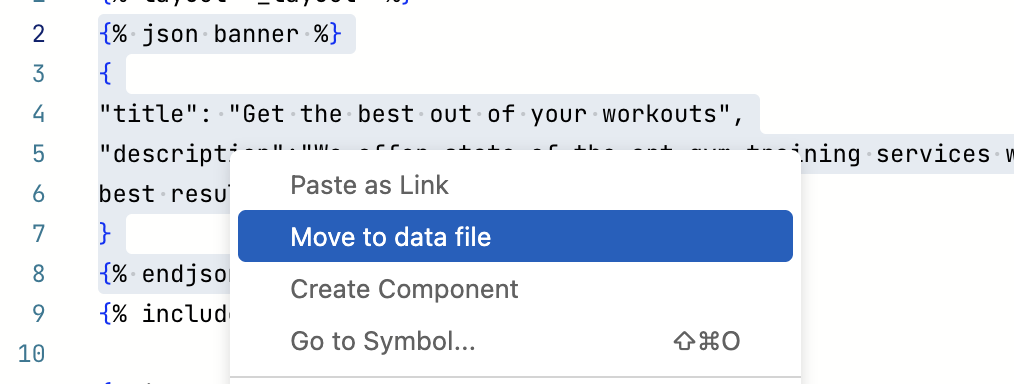
The fastest way is to select complete json tag in your liquid file, right click and select Move to data file menu. This moves the json data into the data file of the page, separating your data for easy access and makes your liquid parts resusable.
Data File Naming
The naming of data file is different for regular pages and collections.
.Regular Pages
For regular pages, data files have same name as their parent directory. For example, pages/services.liquid and pages/about.liquid pages will have their data stored in pages/pages.json while a file at pages/services/photopgraphy.liquid will have it's data stored in pages/service/services.json file.
Collection Pages
For collection pages, data files have same name as their collection name. For example, mdpages/blog.liquid will have it's data stored in mdpages/blog.json and mdpages/blog.md.liquid will have its data in mdpages/blog.md.json
Open Graph Image files
extension: .og.liquid
These are special liquid files that are not publicly rendered but are used for rendering OG images for your pages. They should have same name as the liquid file they represent. For example, a page at pages/services.liquid can have a pages/services.og.liquid for creating it's OG image.
Markdown files
extension: .md
Markdown is a lightweight content formatting language. TailStatic uses markdown for rendering collections such as blog, documentation, changelog etc.
Each markdown file must have front-matter in yaml format and must include title at the minimum.
---
title: Document title
created_on: 2026-05-17
summary: A brief summary about the document.
tags:
- tag1
- tag2
---
The front-matter will be available in the liquid file as page object.
{{page.title}} -- displays Document title on liquid page
{{content}} -- renders content of the document
Collection root files
extension: .liquid
These files are used as landing page of a collection. These are named as <collection>.liquid inside mdpages folder. For example, https://yourdomain.com/blog will render mdpages/blog.liquid file.
Single post layout files
extension: .md.liquid
These files are used as layout file for a single .md file of the collection. The contents and front-matter of the markdown pages are available in this file.
Config Json files
extension: .config.json
These are json files that store configuration for your collections. They are placed in mdpages directory and have same name as the collection. For example a blog collection may have below config file.
{
  "numberOfPosts": 9,
  "pinnedPost": "getting-started-with-blog",
  "sortBy": "created_on",
  "publishMarkdown": true
}
Form Json files
extension: .json
These are json files that store information about your forms. They are placed in forms directory.
Ideally these should not be edited manually. Instead you should use form editor.
A simple subscription form file could look like below.
{
  "name": "New FMR",
  "formId": "subscribe",
  "fields": [
    {
      "name": "name",
      "label": "Name",
      "type": "text",
      "default": "",
      "required": true,
      "allowedItems": [],
      "allowMultipleSelection": false,
      "maxSelections": null,
      "minSelections": null
    },
    {
      "name": "email",
      "label": "Email",
      "type": "email",
      "default": "",
      "required": true,
      "allowedItems": [],
      "allowMultipleSelection": false,
      "maxSelections": null,
      "minSelections": null
    }
  ],
  "captchaEnabled": false,
  "captchaAPIKey": "",
  "expirationDate": null,
  "honeypotFieldName": "_fake_field",
  "sendNotification": true,
  "emailAccount": "[email protected]",
  "receiverEmails": "[email protected]"
}
Note that this file only stores form definition. The actual form html can be designed as per your site's theme. The form action must be set to /form/<form_file_name> and method must be 'POST'.